add the quantity of each column in both tables. highlight the values 1,2,3

Frank

Member
Your spreadsheet does not help explain the process taking place. If you are comparing row 30 with column V why are you only finding 2 matches? I find 7 matches and that incudes duplicates. There are two 01's,two 6's two 51's and 2 56's.

So comparing row 43 with column V there are 7 matches if you inclide the duplicated number 6. There are 6 if you ignore the duplicated number 6. So what exactly ARE you doing??
 

jack

Member
Hello Frank, sorry for the duplicates, I didn't notice, Frank = each of the 4 zones was joined side by side having columns as rows, their joining with the objective of joining rows with 0,1,2 since there are 3 to 4 of them that's why there are double numbers, sorry for not seeing double numbers when joining the 4 sectors objective = is to find with 0,1,2,3, points, to use as a filter to exclude these rows, example = if I have a row of 20 numbers with zero, the twenty points will be in the remaining 80 or in its mirror, you can also use the most loaded rows or columns as fixed frank = when you tell the random generator to make bets, it takes numbers from the entire matrix, so with the data I can take the hottest zones. You just need to calculate the rows as you did in the other previous spreadsheet

 

Frank

Member
I didn’t understand any of that. You lost me at 4 zones. What 4 zones???? There are no zones on that spreadsheet. I’m out.
 

jack

Member
Frank, essas são as 4 zonas em 4 cores da planilha anterior, já que a loteria keno 100-20 é a mesma, os 4 setores da planilha anterior foram unidos lado a lado no fórum unido a partir da planilha que você fez anteriormente.
 

jack

Member
Frank, these are the 4 zones in 4 colors from the previous spreadsheet, since the keno 100-20 lottery is the same, the 4 sectors from the previous spreadsheet were joined side by side in the joined forum from the spreadsheet you made earlier.
 

Frank

Member
So why did you upload that second spreasheet if it has nothing whatsoever to do with your question?
 

Frank

Member
I can see that the 5 columns on spreadsheet 2 are the joined 4 zones from spreadsheet 1 it would have been better if you had said that straight away in your post so could make an Informed decision whether to proceed. I know as you have a tendency to elaborate on a project after getting a reply, you do not disclose the full extent of your needs In your first post.
 

jack

Member
hello FRANK!!ok thanks for seeing the post, when I put it in columns and rows I don't notice the repetition. frank this is my keno has 100 numbers the answer seems to be better when treated in groups of 5 numbers instead of each number alone, the objective of the macro is to see if one of the 5 or 10 has 0,1,2,3,4, to use as a filter or think if I have a column with 3 the other 17 points are in the remaining 60
 

Frank

Member
When you add your 2 new tables to the original sheet it gets more difficult to follow whats happening.
Your 2 extra comparison tables are in columns DU to DZ (table A) and DB to DK (Table B).
The results of comparing each line of lottery results with table A are in columns CG to CK labelled 4 zones 1,2,3,4 and 5. The counts of 1,2,3 are highlighted on each row of lottery results
Fot table A how many of each zero,1,2,3,4, etc there are is above on line 3.

The results of comparing each line of lottery results with table B are in columns CM to CV.The counts of 0,1,2,3 are highlighted on each row of lottery results.

Thats enough now, its complicated enough, even for you. The same link as before connects to the modified sheet.
 

jack

Member
hello FRANK, ok now I can see the hot and cold zones moving through the columns, in tables A and B =, HOT ZONES, is where there is the greatest accumulation of numbers drawn in each draw line and cold zones are the zones where the least numbers drawn, I will use them as filters, that is, instead of using minimum x maximum configuration filters, I will use the entire column as a filter excluding low incidence columns, that is, filtering by groups, as the spreadsheet shows trends, great work, thanks Frank.
 

jack

Member
Hello Frank, can you help me with this question? For example, I choose the 1st position in table A, which has 13 numbers, and I choose column 7 in table B, which has 1 correct answer in one of the draws. The question is, can I use the 7th position in table B to enter table A TO REDUCE THE 4 NUMBERS? KNOWING that 5x10=50 combinations of all possibilities.
 

Frank

Member
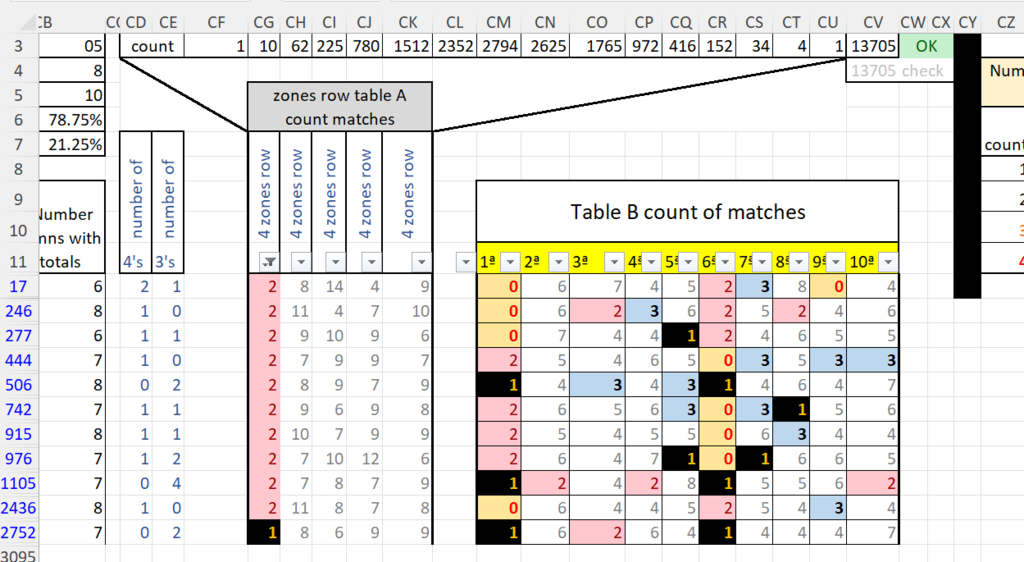
I dont know what search you used to get 13 results filtering Table A 1st column ( thats column CG on the sheet). Filter for number 1 you get 1 result, filter for number 2 you get 10 results. Filter for both 1 and 2 you get 11 results.
it returns rows 17 ,246 ,277, 444, 506, 742, 915, 976, 1105, 2346, 2752.

fig-1.png


You can add to that by for example filtering 7th position in table B looking for 1. this returns only row 976 as there is only one occurrence of the number 1 in that column within the results from the other filter.
this happens when the other filter (col CG) has found a 2 in that column.

So the result on row 976 :-

04​
13​
14​
19​
23​
29​
30​
38​
39​
40​
42​
64​
74​
78​
79​
80​
81​
82​
92​
98​

satisfies the double search down columns CG and CS. I hope thsi answers your question.
 

jack

Member
ok frank perfect, congratulations, working keno (100-20) in small groups in this case groups of 5 numbers, proved to be quite efficient, both for deleting or for playing. whoever sees the post and plays keno canada 80/20 can use this too or other kenos.
 

Sidebar

Top